.fmplugin
Mac
FileMaker Pro on macOS, with the native plugin surface plus macOS-specific preview and import behavior where supported.
RCCPhotoGrid for Mac and Windows
Browse, preview, edit, select, drag, drop, and script FileMaker container workflows on both Mac and Windows.
RCCPhotoGrid
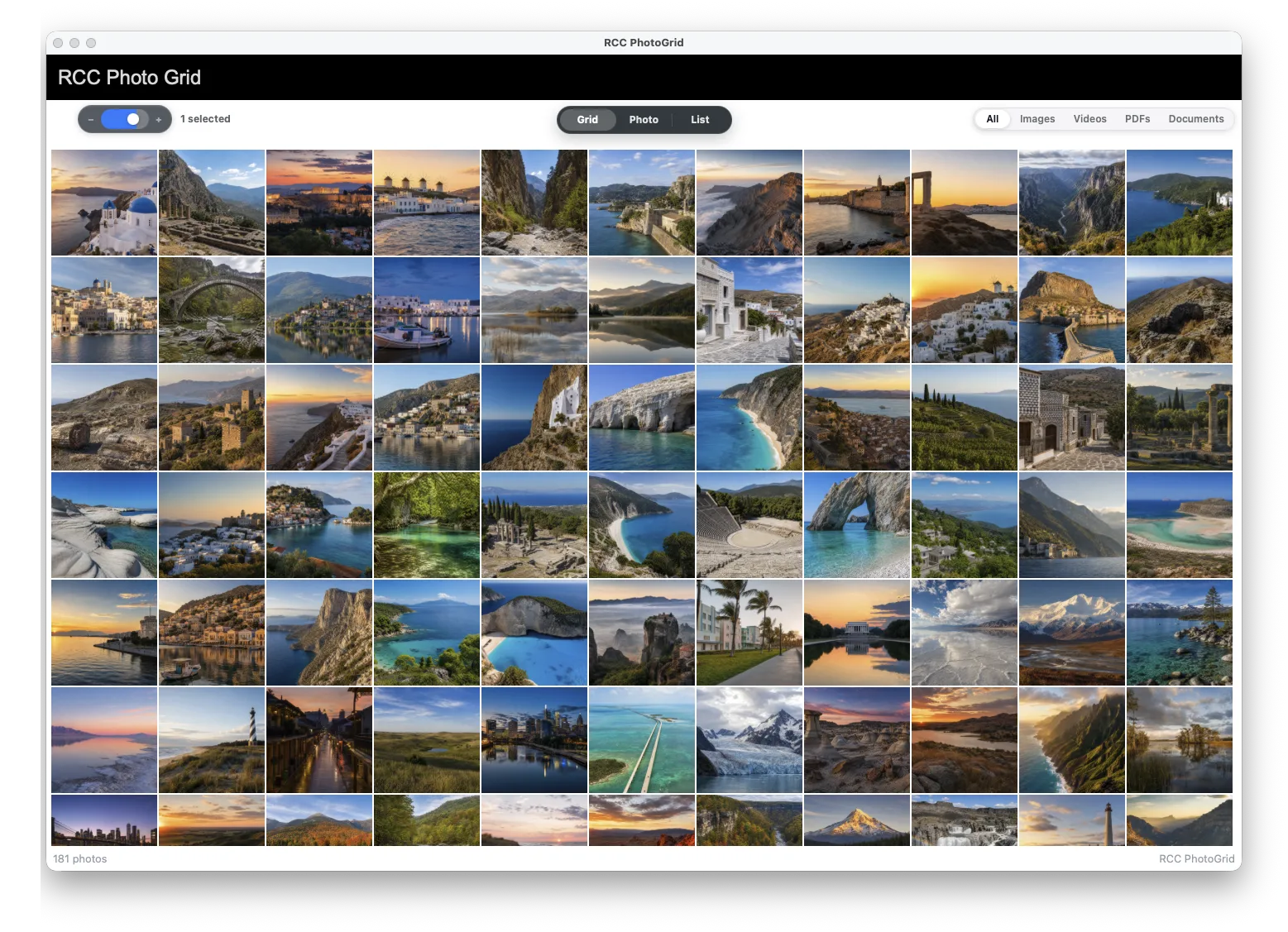
Built for both platforms
The plugin is designed around FileMaker realities on both desktop platforms: named objects, found sets, JSON, callbacks, scripts, and container fields.
.fmplugin
FileMaker Pro on macOS, with the native plugin surface plus macOS-specific preview and import behavior where supported.
.fmx64
FileMaker Pro on Windows, sharing the external function surface for overlay, data loading, selection, callbacks, drop, export, and Browse-mode sync.
Built-in editor
Users can crop, rotate, flip, adjust, copy, paste, and save changes back through your FileMaker script to the container field. No custom editor and no export/import-back chore.
Built-in photo editor
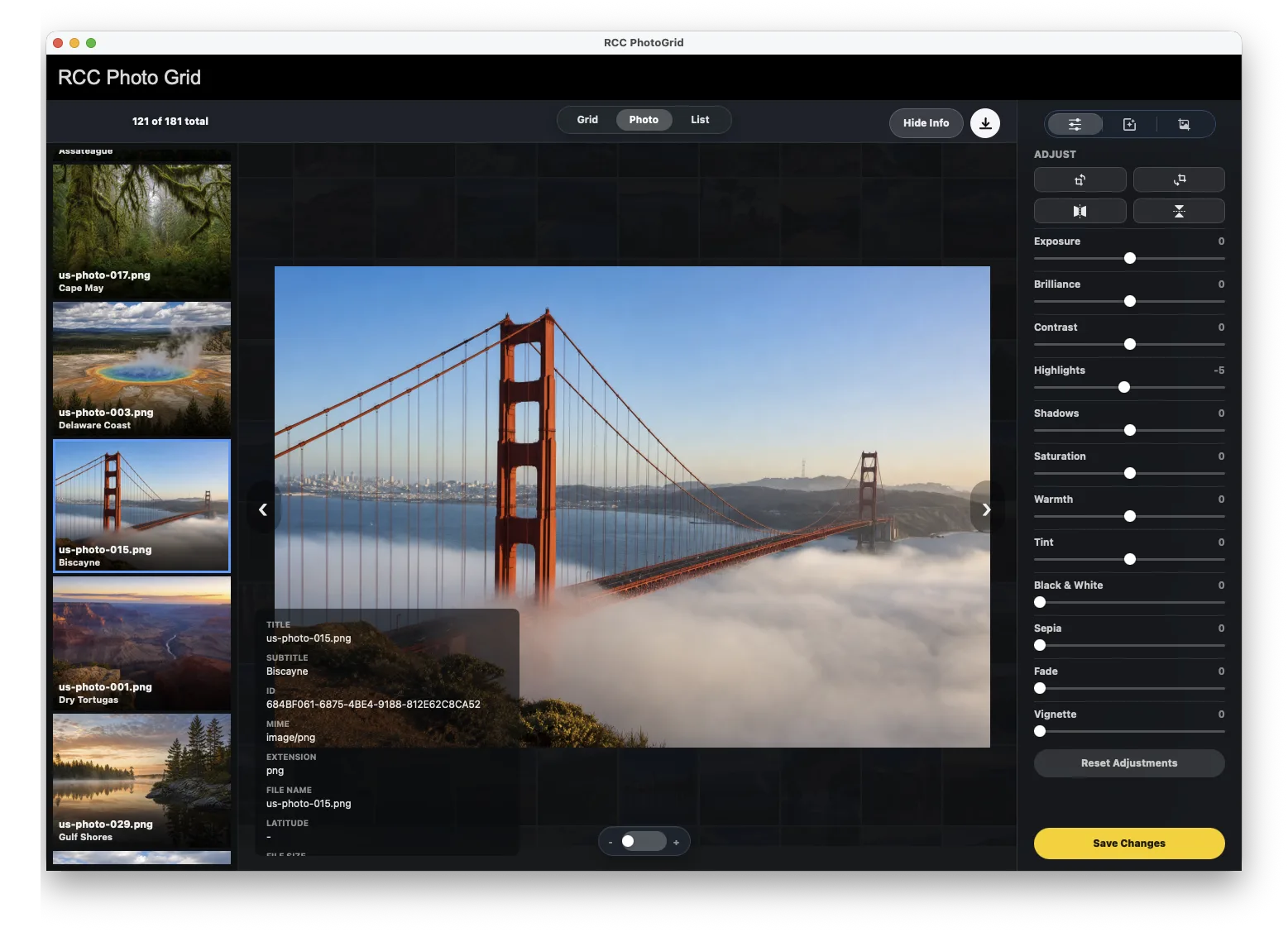
Crop, rotate, flip, adjust, copy, paste, and save without building a custom editor.
The Save Changes callback returns the edited image so FileMaker can write directly to the container field.
No export, edit somewhere else, and import back. The workflow stays inside FileMaker.
Photos-style browsing plus a dense list view for filenames, subtitles, sizes, and metadata.
Read selected IDs as FileMaker return-delimited text whenever your script needs them.
Drop files into the solution and drag selected items back out to Finder/Desktop workflows.
How it works
Draw a normal FileMaker object, name it photoGridPlaceholder, and let FileMaker own the layout geometry.
Call RCC.PhotoGrid.CreateWithControl with the active window and object name. The plugin aligns a native overlay to the live frame.
Send compact JSON generated from your found set. RCCPhotoGrid handles the visual grid, selection cache, and callbacks.
Developer surface
Create the overlay, load found-set JSON, read selection state, register callbacks, configure display/context behavior, and close overlays cleanly.
RCCPhotoGrid API
RCC.PhotoGrid.VersionRCC.PhotoGrid.CreateWithControl ( windowName ; objectName )RCC.PhotoGrid.SetFrameWithControl ( gridID ; objectName )RCC.PhotoGrid.SetFrame ( gridID ; left ; top ; width ; height )RCC.PhotoGrid.Refresh ( gridID )RCC.PhotoGrid.Refresh ( windowName ; gridID )RCC.PhotoGrid.SetData ( gridID ; json )RCC.PhotoGrid.LoadDemoData ( gridID )RCC.PhotoGrid.GetSelectedIDs ( gridID )RCC.PhotoGrid.ShowImage ( gridID ; dataURL ; title )RCC.PhotoGrid.ShowImage ( windowName ; gridID ; dataURL ; title )RCC.PhotoGrid.ShowQuickLook ( gridID ; dataURL ; title )RCC.PhotoGrid.ShowQuickLook ( windowName ; gridID ; dataURL ; title )RCC.PhotoGrid.GetOpenRequest ( gridID )RCC.PhotoGrid.GetOpenRequest ( windowName ; gridID )RCC.PhotoGrid.SetOpenScript ( gridID ; scriptName )RCC.PhotoGrid.SetSingleClickScript ( gridID ; scriptName )RCC.PhotoGrid.SetDoubleClickScript ( gridID ; scriptName )RCC.PhotoGrid.SetDropScript ( gridID ; scriptName )RCC.PhotoGrid.SetDeleteScript ( gridID ; scriptName )RCC.PhotoGrid.SetSaveScript ( gridID ; scriptName )RCC.PhotoGrid.SetIPhoneImportScript ( gridID ; scriptName )RCC.PhotoGrid.ImportFromIPhone ( gridID )RCC.PhotoGrid.SetContextMenuOptions ( gridID ; optionsJSON )RCC.PhotoGrid.SetDragExportScript ( gridID ; scriptName )RCC.PhotoGrid.SetDisplayOptions ( gridID ; optionsJSON )RCC.PhotoGrid.GetDebugStatus ( gridID )RCC.PhotoGrid.Close ( gridID )RCC.PhotoGrid.CloseAllCore features
Create and refresh a native overlay above a named FileMaker layout object using GetLayoutObjectAttribute geometry.
Load IDs, titles, subtitles, thumbnails, file hints, metadata, and initial selection state from a JSON array.
Switch between grid, list, photo view, and script-configured HorizontalView or single-photo widget presets.
Ask FileMaker for the full asset only when needed, then preview images, Quick Look files, copy/paste, and save edits back to containers.
Accept dropped files and folders, then drag selected items back out to Finder/Desktop through script callbacks.
Wire single-click, double-click, delete, save, drop import, drag export, and iPhone import events into FileMaker scripts.
Native overlay anchored to a named FileMaker layout object
CreateWithControl, SetFrameWithControl, manual SetFrame, and Refresh positioning paths
Browse-mode visibility sync through FileMaker idle callbacks
Multiple grids, each addressed by a stable gridID
Found-set loading from a JSON array of item objects
Item fields for id, title, subtitle, thumbnail data URL, MIME/type, extension/fileType, metadata, folder flag, photo flag, and initial selected state
Grid view with responsive thumbnail sizing
List view with thumbnail, title, subtitle, and metadata chips
Photo view/lazy viewer with previous/next navigation
Script-configured HorizontalView strip with thumbnail, compact, and verbose styles
Minimal widget presets for grid, list, HorizontalView, lazy viewer, and single-photo use
Filter controls for All, Images, Videos, PDFs, and Documents
Zoom controls plus script-set zoom levels and thumbnail sizes
Multi-selection: click, Shift-click range, Option/Alt-click toggle
Ready when your solution is
Start with the docs, then wire the plugin into your real FileMaker layout, scripts, container fields, and found-set JSON.